mejl


Create and use snippets
Save text you write often, then insert it into a message with a short slash command.
Updated August 6, 2026
01
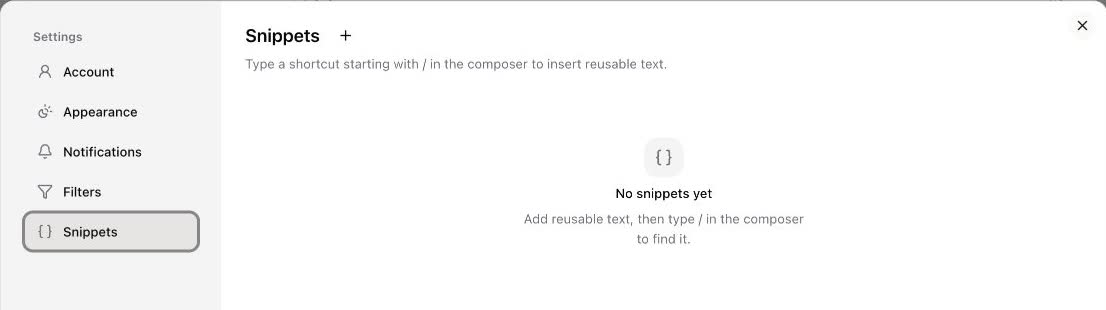
Open Snippets in Settings
Open the account menu, select Settings, then choose Snippets. Select the plus button beside the Snippets heading.
02
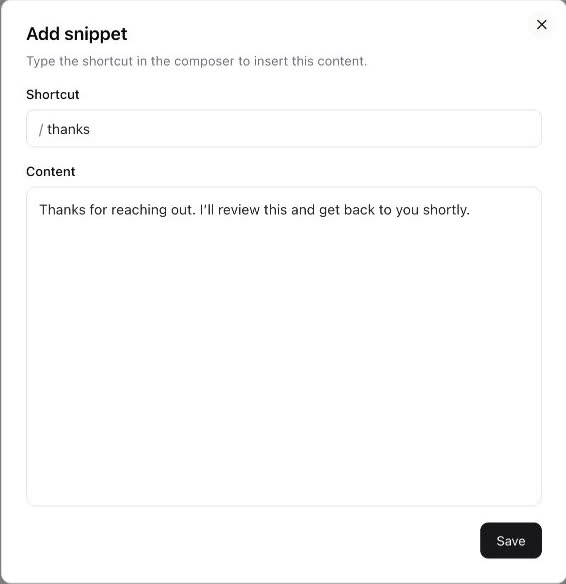
Choose a shortcut and content
Enter a short shortcut without the slash, then add the text you want to reuse. For example, the shortcut thanks becomes /thanks in the composer.
Insert the snippet
Select Save, open the composer, and type / followed by the shortcut. Choose the snippet from the suggestions to insert its content at the cursor.
Related guides
Still need help?
If a guide doesn’t cover what you’re after, send us a message and we’ll get back to you.